
NN.Examples.Models.Generative.Diffusion follows data through noising, denoiser training, sampling,
and a saved image artifact. The model, sampler, and specification-level diffusion definitions are
all Lean code.
Run It First
For a short runtime check, use the CUDA path with a tiny model:
lake -R -K cuda=true exe torchlean diffusion --device cuda --dataset cifar10 --n-total 1 --steps 1 --hidden-c 1 --T 2
For a more informative local run, use CUDA if available. The command writes a JSON loss log and a PPM image artifact for inspecting both numbers and pixels:
python3 scripts/datasets/download_example_data.py --cifar10

lake -R -K cuda=true exe torchlean diffusion --device cuda \
  --dataset cifar10 --n-total 800 --steps 50 --hidden-c 8 \
  --log data/examples/diffusion_trainlog.json \
  --sample-ppm data/examples/diffusion_sample.ppm
The command is small enough to run locally, but it still exercises the full path: data conversion, typed tensors, runtime model, sampler, and saved artifacts.
Data: Where Images Come From
TorchLean does not decode JPEG/PNG inside Lean. Image decoding and resizing happen before Lean; the
Lean side receives fixed-layout .npy tensors and checks their shapes.
Once the arrays exist, Lean loads tensors with axes ordered as
[batch, channel, height, width], checks their shapes and class range, and batches them. This is a
layout convention for the dataset, not a separate image tensor type.
The two dataset modes in NN.Examples.Models.Generative.Diffusion are:
- CIFAR-10 as $(N,3,32,32)$ arrays.
- ImageNet-style folders converted to $(N,3,64,64)$ arrays (Imagenette, Tiny-ImageNet, or any folder with class subdirectories).
Inside the example, the loader path is straightforward:
- Build a labeled source over
.npyfiles. - Load it into a dataset.
- Create a shuffled batch loader.
- Map pixel values from $[0,1]$ into the diffusion range $[-1,1]$.
That last step is a single call in the example code, applied to the typed minibatch after cropping:
pure (diffusion.unitToSignedUnit unitImage)
diffusion.unitToSignedUnit keeps the tensor shape and only rescales values from $[0,1]$ to
$[-1,1]$.
The Spec Layer: What We Mean By “Diffusion”
TorchLean keeps diffusion vocabulary in NN.Spec.Generative.Diffusion.*, so training code, sampler
code, and proof modules talk about the same objects.
The DDPM picture is simple enough to state before the formulas: add noise to an image at timestep $t$, train a model to predict the noise that was added, then run reverse steps that use the model’s noise prediction to move back toward a clean image. TorchLean gives each component a named definition so the runtime command and proof modules use the same vocabulary.
At the center is an interface for an epsilon-prediction denoiser:
structure EpsModel (α : Type) (s : Shape) [TorchLean.Storage α] [Context α] where
  eps : Tensor α s → α → Tensor α s
The forward noising process is the standard DDPM formula, but written as a total tensor definition:
def qSample (sched : VPSchedule α T)
    (x0 : Tensor α s) (t : Fin (T + 1)) (eps : Tensor α s) :
    Tensor α s :=
  let αbar : α := sched.alphaBar t
  let c0 : α := sqrtNonneg αbar
  let c1 : α := sqrtNonneg (1 - αbar)
  Tensor.scaleSpec x0 c0 + Tensor.scaleSpec eps c1
The training objective is also named at the spec level:
def epsPredLoss (sched : VPSchedule α T) (model : EpsModel α s)
    (x0 : Tensor α s) (t : Fin (T + 1)) (eps : Tensor α s) : α :=
  let x_t := qSample sched x0 t eps
  let tScalar : α := VPSchedule.timeOfIndex (α := α) (T := T) t
  let epsHat := model.eps x_t tScalar
  Spec.mseSpec epsHat eps
Then the surrounding spec modules define:
- a discrete VP schedule
VPSchedulewith $\beta_t$, $\alpha_t=1-\beta_t$, and cumulative products $\bar{\alpha}_t$; -
two reverse samplers:
- DDPM: a stochastic reverse step with explicit per-step noise inputs,
- DDIM ($\eta=0$): a deterministic reverse step that reuses the same denoiser but drops the noise.
There are also “hooks” that let diffusion samplers plug into the generic dynamical-system API. For
example, the DDIM spec exposes ddimStepSystem and proves the step definition by rfl so other
theory can rewrite it safely.
The Runtime Layer: The Model That Runs
The runnable diffusion command does not work directly with EpsModel. It instantiates a concrete
neural network and then uses the public data API to build training samples.
Two choices matter in the example:
- The epsilon predictor is a residual CNN that preserves resolution
(
nn.models.Diffusion.NoisePredictor.residual). The training, sampling, and visualization path stays easy to run on a local checkout. - Time is fed to the model as an extra channel: when the data has $c$ channels, the input has $c+1$ channels. The last channel is the normalized timestep broadcast across spatial positions.
That “append time as a channel” trick is defined once in the public API. Callers provide the leading dimensions and spatial extents; the helper returns a tensor with one additional channel:
let modelInput :=
  diffusion.appendTimeChannel [batchSize] ([h, w] : Tensor Nat [2]) x_t tNorm
The model is a same-resolution residual CNN sized to run as an example. The example fixes a configuration for one image size and hands it to the public constructor, which owns the convolution geometry, residual blocks, and seeded initialization:
def config (c h w hiddenChannels : Nat) :
    nn.models.Diffusion.NoisePredictor.Config 2 :=
  { dataChannels := c
    spatial := [h, w]
    hiddenChannels := hiddenChannels
    kernelRadius := [1, 1] }

def model (c h w hiddenChannels : Nat) :
    nn.Builder (nn.Sequential (input c h w) (output c h w)) :=
  nn.models.Diffusion.NoisePredictor.residual
    (config c h w hiddenChannels) (batchShape := [batchSize])
The 2 is the spatial rank, and a kernel radius of one means every convolution is a 3 x 3
same-padding kernel. The contract is dimension-general: the input has arbitrary leading axes, one
channel axis, and any number of spatial axes. The runnable image example instantiates this with
batch, channel, height, and width axes. Its output predicts noise with the original data shape.
The source wraps the call in a short rw/simpa step so that the constructor’s computed shapes
line up with the example’s input and output abbreviations.
Training: What Gets Optimized
Training is classic DDPM-style $\varepsilon$-prediction. Each step:
- pick a real image batch $x_0$,
- pick a timestep $t$,
- sample noise $\varepsilon$,
- pair
appendTimeChannel x_t tNormwith the target noise $\varepsilon$, - take an optimizer step on MSE.
TorchLean makes the supervised pair explicit as a Sample.Supervised value. The operation that
constructs $x_t$ from $x_0$ and $\varepsilon$ is
TorchLean.diffusion.noisedSampleFromNoise; it is the runtime version of the same formula used by
qSample in the spec layer.
The helper performs the schedule lookup, noising formula, time-channel append, and supervised-pair
construction. diffusion.noisedSample draws the noise from a seed; noisedSampleFromNoise takes
the noise tensor as an argument:
let sample :=
  diffusion.noisedSample [batchSize] ([h, w] : Tensor Nat [2]) schedule x0
    (seed := runtime.seed) (step := step)
let sampleFromNoise :=
  diffusion.noisedSampleFromNoise [batchSize] ([h, w] : Tensor Nat [2]) schedule x0 eps step
The schedule length is part of the type. A Schedule T for T diffusion steps cannot be used
with a different timestep count, and the runnable command rejects T = 0 before constructing its
first sample. The noise seed controls only the sampled noise; the step argument selects the
schedule coefficient.
Sampling: DDIM Replay In Lean
The example uses deterministic DDIM because it is easy to audit and stable at small scale.
The reverse update used by the runnable example is TorchLean.diffusion.ddimPrev. It does the usual
“predict x0, clip, remix” step:
- estimate $\hat{x}_0$ from $x_t$ and $\hat{\varepsilon}$,
- clamp it to $[-1,1]$,
- recombine it using the previous schedule coefficients.
The public helper takes the current sample, predicted noise, and adjacent schedule coefficients:
let previous := diffusion.ddimPrev abPrev ab x_t epsHat
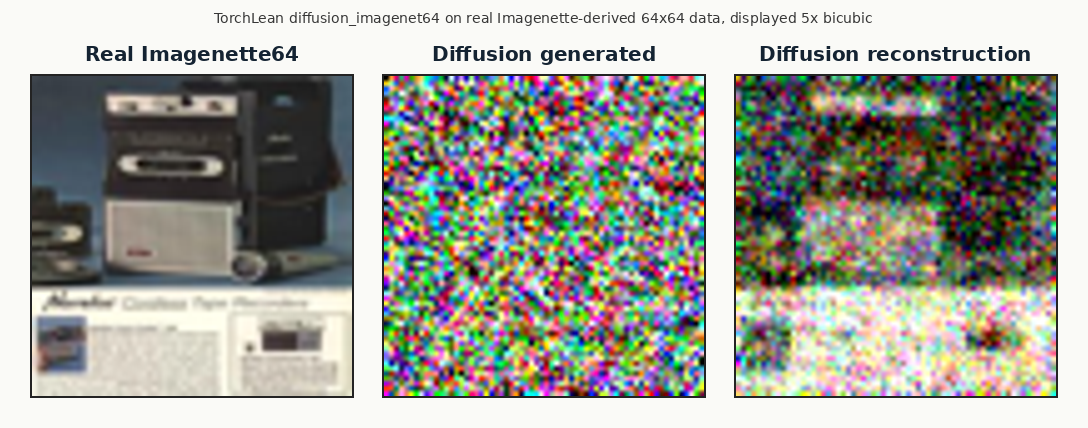
The sampler also produces the “three pictures” view:
- a reference image (the real $x_0$),
- a noisy image at a chosen timestep,
- a reconstruction from DDIM reverse steps starting at that timestep.
What To Look At After A Run
Diffusion runs are easy to misread from terminal loss alone, so the example pushes you toward artifacts: images on disk and a JSON curve log. Those files give you something concrete to compare across CPU/CUDA, fast-kernel switches, schedule tweaks, or model width changes.
For interactive inspection, open NN.Examples.Models.Generative.Diffusion in VS Code with the Lean
Infoview enabled. The widgets can display tensor summaries, graph and shape views, and saved JSON
logs next to the source.
Source entry points: